Tuesday, October 13, 2015

Search Storage in SharePoint 2013


Search generates different kind of data while crawling , Following are the types of data

        1).Crawl data - is from where the index is built - this is stored on the SQL server. - The Crawl database stores the state of the crawled data and the crawl history.
 
       For SQL server sizing we only need to care about the crawl data.

* For  10 million items - 15GB DB, 2GB log

* For 100 million items - 110GB, 50GB log

currently we have one crawl database ,it can store up to 20 M items.

2) Link DB - The Link database stores the information that is extracted by the content processing component and the click through information.

* For 10 million items - 10GB DB, 0.1GB log

* For 100 million items - 100GB, 5GB log

3) Index - is where the search results are queried from - this is stored on the SharePoint servers.

       Default Index Location is : C:\Program Files\Microsoft Office Servers\15.0\Data\Office Server\Applications


Wednesday, July 8, 2015

IRM Limitations in SharePoint 2013 On premises.


PDF document cannot be in IRM enabled libraries in ADOBE Reader, to make it work we have to rely on third party readers like foxit,nithyo
 
Excel Sheets we cannot open in the browser if these sheets are stored in the SP library where IRM is enabled.
 
We don’t have direct control over IRM permissions in SharePoint 2013,  according to SP permissions given for user on library IRM permissions will work. Means IRM is relied on SP for permissions.   
 
These are true to my investigation from Microsoft Forums and TechNet Articles.

Apps configuration in SharePoint 2013


Apps Configuration high level steps and points to consider while setting up Apps in SharePoint 2013 on premises.
  1. Create forward lookup zone in the DNS server
  2. Create alias on this zone , provide the wildcard as *  and provide FQDN for target host as SharePoint Server.
  3. Configure subscription service by using PowerShell
  4. Configure apps service by using PowerShell
In SP CA :
In the Apps section in central admin, in the apps domain section, provide the domain name (zone) which you have configured in DNS
Provide any convenient prefix name  in the App Prefix like “app” and hit ok.
Point to Note :
Apps should have dedicated web application and app catalog should be created in this web application.
And that web application should not have any host headers (host names)

Tuesday, June 2, 2015

Configuring RMS in SharePoint 2013 on premises.


This post talks detailed high level steps that are to be implemented for the configuration of IRM in SharePoint 2013 on premises for both internal and external users.

Required Servers:

1)      SharePoint Server : We have to make changes in the Central Admin under security section with RMS Server name so that SP Server talks to the RMS server

2)      RMS Server:  This is place where core RMS role will be installed and other configuration changes we need to do.

3)      Reverse Proxy Server:  In order to authenticate external users RMS server has to authenticate them so we need to have published internet server , in this case we are taking fresh new server and where we setup reverse proxy. More details in the following sections.

Following are the things need to be in place before configuration:

·         SSL Certificate for the reverse proxy server and host name which will be published in Internet by   mapping with the public IP and SSL will be configured and implemented with this same host name.

·         Note all the server names and IPS and also note the public IP which we are going to do natting with the   reverse proxy server.

·         Also get the respective service account provisioned for the RMS Server to manage and need to specify the same during RMS cluster configuration.


Configuring RMS Server :

Here I am not posting screenshots, just mentioning what needs to be taken care.

1)      Install the AD RMS Server role from server manager and install the required features. After installation of the same ,right click the ADRMS console at the top and right click and click on Add cluster, provide RMS Service account credentials in the place of service account details.

2)      After above step, you will get cluster name and right click on it and choose properties,

In properties you find following different tabs ,each has it is own functionality,

 
Cluster URLs:

It will have 2 sections, intranet and extranet, we have to specify the URLS in this two sections.

 These URLS are used by clients who connects to AD RMS server for licensing and certification purpose.

 In the intranet URL section, we need to specify the FQDN Name of the RMS Server.

In the extranet URL section, need to specify the host name configured in the reverse proxy server ( details in the following sections), which has been exposed to internet and configured reverse proxy so that requests will be routed to RMS Server from reverse proxy server.

 Proxy Settings:

This cluster server uses the proxy server to access external network in our case external server is reverse proxy server where proxy rule is configured so that whoever hits rms server from external will be authenticated by reverse proxy server and requests are sent back to the RMS Server.

 
Configuring Reverse Proxy Server:

 Following are the configuration need to be done before we set up reverse proxy.
 
1)      Local Server IP should be mapped or natting has to be done with the public IP of the reverse proxy server.

2)      Install IIS server, host name to be mapped with the public IP by doing URL publishing.

3)      DNS entry has to be created locally and also in extranet (URL Publishing) with host name.

4)      SSL certificate should be ready with the host name mapping done, during creation of SSL certificate.

     After above things ready,


·         Install URL Rewrite module for IIS with the help of Web Platform Installer and Also install Application Request Routing (ARR) for IIS with the help of Web Platform Installer

·         Open Internet Information Services (IIS) Manager and navigate to Sites → Default Web Site and select URL Rewrite from IIS features.

·         Right click in the Inbound Rules Section and click Add Rule(s)…  

·         Select Reverse Proxy under Inbound and Outbound Rules section

·         Provide the details of the server to be redirected to and click OK

·         Now you can see the Rewrite rule added to the Inbound Rules section.

·         Now we need to specify this HOST NAME url in the RMS Server under clustered url section and under extranet url section.


In the RMS Server :

Open IIS Manager and navigate to Default Web Site. Right click on Default Web Site and click Explore.

Navigate to _wmcs → certification

Right click on the “ServerCertification.asmx” file and select Properties

Navigate to Security Tab and click on Edit

Type Everyone and click on Check Name, then click on OK.

Check Read & Execute and Read permissions under Allow and click Apply, then click OK.

 Configuration in SharePoint Server :

·         Turn on IRM service in SharePoint Central Administration  :After activating the Rights Management service, you must sign into the SharePoint Central Administration to turn on Information Rights Management (IRM).

·         Login into SharePoint Central Administration with a Farm Administrator account

·         And then finally enable IRM in SharePoint library.


With this whole configuration is done, it does not have screenshots ,please mail me if you need I will send document, my email is  ramch011@gmail.com


Thank you.


Sunday, May 17, 2015

SharePoint 2013 Licensing - On Premises


SharePoint 2013 Licensing has 2 Models :

1)      Server + CAL
2)      Server Only
Depends on the type of environment we have to choose among the 2 options.

 Intranet :
In intranet scenario we have will to go for option 1 means we have to go for Server + CAL.
 
Server à depends on how many servers running in each farm, license will be calculated according to no of instances(servers) in farm. If no of servers are 4 in the SP Farm, need to buy 4 server license.

CALà this depends no of users who are accessing the SharePoint portals , 500 are users accessing SP portal then need to buy 500 CAL.

4 servers in farm and 500 users accessing the SP services based on this we have to go for option 1 ,means you have to buy server + CAL.

 Extranet:
People whose user accounts are not of AD, users belongs to third party LDAPs, and looking for access SP Site ,in this case no CALS are required.
Server license (Option 2) permits the external users without any additional CALs.

Internet:

Intranet users who wants to access the portals from internet , in this scenario also, need to choose OPTION 1 and no CALS are required.

Thursday, May 14, 2015

Search - File Shares as Content Source in SharePoint 2013 On Premises


Few things about File Share Content Source

1.Crawled files in file share system contain metadata that can be used by the search refiners in SharePoint

2.Can use SharePoint Search refiner to filer search results based on file type or author for the file shares which is supported by default.

3.Managed properties which are available for file shares contain Author,ContentType,DisplayAuthor,FileExtension,FileType,Title,IsContainer,ContentSource,Created and so on . You can use them for filtering file share content in search results or customizing your search result display template. For filtering file share content in search results based on the folder structure, you can use "Path" managed property.

 4.When end users search the document in the search site it will be displayed according to the permissions given on the files and folders , this happens automatically.

 5.Actually core content is stored on file server itself, only metadata associated with the indexed content will be stored in SharePoint. This metadata entirely different from actual metadata services.


Monday, December 29, 2014

Event 3760 – SQL Database on SQL Server Instance not found in Event Log in SharePoint Server


Problem :The event log on my WFE is filled with errors every hour complaining that a database on my SharePoint SQL instance is not found.

Cause: This was caused by me creating and deleting a service application, and then going into SQL Management Studio and manually deleting the associated service application database. SharePoint still had a record of the database in its config database.

Solution : Delete the record of the orphaned database using PowerShell

  1. Open SharePoint Management Shell
  2. Type: Get-SPDatabase | fl name, id
  3. Find the database you wish to remove and select its ID.
  4. Type: $pp = get-spdatabase <id>
  5. Type: $pp.delete()
SharePoint’s record of the database is now deleted and it should no longer complain that the database is not found.

Monday, August 18, 2014

Changing Password in SharePoint 2013 by powershell


Follow these steps to change the password for SharePoint :
 
·         Open up the SharePoint PowerShell command prompt
 
·         Set-SPManagedAccount - UseExistingPassword -Identity DOMAINA\SPSAdmin
 
·         Where DOMAINA\SPSAdmin is service account that had it's password changed in the AD
 
·         You will then be prompted for the existing\new password for "DOMAINA\SPSAdmin"
 
·         Run "Repair-SPManagedAccountDeployment" to verify
 
·         the passwords are now in sync •Next do an IISRESET command
 
·         Run Repair-SPManagedAccountDeployment to verify that you do not get this message: Repair-SPManagedAccountDeployment : The password for the account DOMAINA\spsadmin, as currently stored in SharePoint, is not the same as the current password for the account within Active Directory. To fix this with PowerShell, run Set-SPManagedAccount -UseExistingPassword
 
·         the Set-SPManagedAccount -UseExistingPassword command will update the config database and service using by this account.


Tuesday, July 1, 2014

SQL Query to check timer job lock


To check which server is taking care of running timer jobs in ShaerPoint Farm, we need to run this query on content database in SQL and we can manage this settings at manage content database in central admin.


select a.lockedby, b.name


from WSS_Content_JCES_Manfacturing.dbo.TimerLock a inner join SharePoint2013_ConfigDB_Aug30.dbo.Objects b


on a.lockedby = b.Id

Monday, April 21, 2014

Enable SharePoint PowerShell Commandlets in the PowerShell ISE

To get the snap in loaded you'll need to add the snap-in in your PowerShell ISE profile. Here's a quick script to get this done from within the ISE, just type this in the ISE command window:
if (!(test-path $profile )) 
{ 
    new-item -type file -path $profile -force 
} 
 

$cmd = 'if((Get-PSSnapin | Where-Object {$_.Name -eq "Microsoft.SharePoint.PowerShell"}) -eq $null) 
{ 
    Add-PSSnapIn "Microsoft.SharePoint.Powershell" 
}'

out-file -FilePath $profile -InputObject $cmd -Append
 
Run the commands then close and open the ISE. You now should have the SharePoint snapin loaded and you should get the friendly auto complete functionality you're used to in the SharePoint PowerShell command window.

Monday, January 27, 2014

Challenges During SharePoint Migration

1) SharePoint Customizations:
The complexity begins with the availability of SharePoint customizations, also commonly known as web parts. Apart from being a very noticeable feature of SharePoint, these web parts actually prohibit you from performing a standard migration and result in an unsuccessful migration process. An unsuccessful or failed data migration can cause loss of data and eventually business.
2) SharePoint Application Inventory:
 
A SharePoint Application Inventory would typically gather the following information:
  • List of all SharePoint Farms, Servers, Server hardware details, Application Install path, Services running on server, etc.
  • Inventory of Web application, Site collection, Custom solutions like Web Parts, Features, Event handlers, etc.
  • List of Users, Groups and Application Level permissions details
  • Size and Complexity of the applications
  • While gathering the SharePoint Application inventory, you may categorize and group them, based on Business, Technical & Design parameters, which may not be always, correct.
 
3) Size & Complexity of the Application
 
  • SharePoint OOB (out-of-box) template based applications are simple & easy to migrate. The complexity comes when you have SharePoint Custom developed application to be migrated.
  • A SharePoint application will be complex to migrate, if it has one or more of the following design elements:
  • Heavy customized Master Pages & Page Layouts User Interface.
  • Custom Solutions like Web Parts, Features, Event handlers, Site templates, List template, Pages & User controls, JavaScript, CSS, CAS, Content Types, InfoPath form etc.
  • Workflows with complex functionality.
  • Custom Search scopes, external content sources.
  • Integration with external systems (SAP, Oracle and etc.)
     
    4) Post Migration Challenges
     
    Once the Migration is complete based on selected migration approach. In case of Database-attach approach you may face many challenges post Migration as many SharePoint design elements are not migrated successfully. Here one should be ready with all the Post migration steps and work around if no out-of-box solution is available.
    Depending on the customization of the SharePoint application, this could potentially result in a lot of post migration related activities. Typically, these would include moving 14 hive folders like images, js, css, etc., master page customisation, visual upgrades, update web.config, resolve absolute URL issues, resetting views for List view Web part, configuring search scopes, etc.
    Some Design elements will have challenge to migrate:
  • Email Enables Lists.
  • The “In Progress” workflow tasks, will have challenge to migrate.
  • SharePoint Web Analytics system is not available in the newer version now. It’s been replaced by new 2013 search service. The previous analytics reports will not be imported into new version.
  • Some of Templates are removed and not supported in the newer version
     
    5) Migration Planning Challenges
     
  • SharePoint Migration Project becomes complex if you have Applications/Sub sites to be migrated in hundreds/thousands, and content size is huge, you need to better plan such migration projects. Large migration projects are generally distributed in smaller migration lots for ease in migration, but managing multiple migration-lots with multiple migration-teams is another challenge.
  • SharePoint Web Application Migration prioritization is a big question – whether to migrate complex application lot first, which will increase the confidence of the migration team and user community, or Plan for simple SharePoint OOB template base application migration, which will migrate quickly and can be released to user community. Normally this decision is driven by business or User requirements.
  • Setting up the environment for Migration & Testing is a challenge. If requirement is for migrating multiple multilingual applications, than you need to verify Migration Tool capability for such requirements.
  • Consider content Migration Time for large Content database with large size attachments, this typically takes significant time while migrating content with Migration Tool.
  • As Migration progresses, you need to plan for Farm Design & Topology, Taxonomy, Capacity Planning, Scalability Requirement, Backup and Disaster management, User Training etc.
 

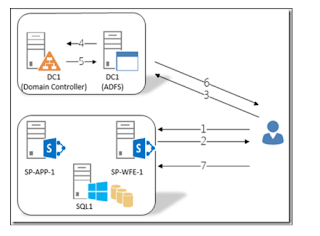
SharePoint 2013 - ADFS - Configuration

The main objective of this post is to provide detailed configuration steps on how to set up SAML Authentication for SharePoint 2013/2016 w...