Monday, April 21, 2014

Enable SharePoint PowerShell Commandlets in the PowerShell ISE

To get the snap in loaded you'll need to add the snap-in in your PowerShell ISE profile. Here's a quick script to get this done from within the ISE, just type this in the ISE command window:
if (!(test-path $profile )) 
{ 
    new-item -type file -path $profile -force 
} 
 

$cmd = 'if((Get-PSSnapin | Where-Object {$_.Name -eq "Microsoft.SharePoint.PowerShell"}) -eq $null) 
{ 
    Add-PSSnapIn "Microsoft.SharePoint.Powershell" 
}'

out-file -FilePath $profile -InputObject $cmd -Append
 
Run the commands then close and open the ISE. You now should have the SharePoint snapin loaded and you should get the friendly auto complete functionality you're used to in the SharePoint PowerShell command window.

Monday, January 27, 2014

Challenges During SharePoint Migration

1) SharePoint Customizations:
The complexity begins with the availability of SharePoint customizations, also commonly known as web parts. Apart from being a very noticeable feature of SharePoint, these web parts actually prohibit you from performing a standard migration and result in an unsuccessful migration process. An unsuccessful or failed data migration can cause loss of data and eventually business.
2) SharePoint Application Inventory:
 
A SharePoint Application Inventory would typically gather the following information:
  • List of all SharePoint Farms, Servers, Server hardware details, Application Install path, Services running on server, etc.
  • Inventory of Web application, Site collection, Custom solutions like Web Parts, Features, Event handlers, etc.
  • List of Users, Groups and Application Level permissions details
  • Size and Complexity of the applications
  • While gathering the SharePoint Application inventory, you may categorize and group them, based on Business, Technical & Design parameters, which may not be always, correct.
 
3) Size & Complexity of the Application
 
  • SharePoint OOB (out-of-box) template based applications are simple & easy to migrate. The complexity comes when you have SharePoint Custom developed application to be migrated.
  • A SharePoint application will be complex to migrate, if it has one or more of the following design elements:
  • Heavy customized Master Pages & Page Layouts User Interface.
  • Custom Solutions like Web Parts, Features, Event handlers, Site templates, List template, Pages & User controls, JavaScript, CSS, CAS, Content Types, InfoPath form etc.
  • Workflows with complex functionality.
  • Custom Search scopes, external content sources.
  • Integration with external systems (SAP, Oracle and etc.)
     
    4) Post Migration Challenges
     
    Once the Migration is complete based on selected migration approach. In case of Database-attach approach you may face many challenges post Migration as many SharePoint design elements are not migrated successfully. Here one should be ready with all the Post migration steps and work around if no out-of-box solution is available.
    Depending on the customization of the SharePoint application, this could potentially result in a lot of post migration related activities. Typically, these would include moving 14 hive folders like images, js, css, etc., master page customisation, visual upgrades, update web.config, resolve absolute URL issues, resetting views for List view Web part, configuring search scopes, etc.
    Some Design elements will have challenge to migrate:
  • Email Enables Lists.
  • The “In Progress” workflow tasks, will have challenge to migrate.
  • SharePoint Web Analytics system is not available in the newer version now. It’s been replaced by new 2013 search service. The previous analytics reports will not be imported into new version.
  • Some of Templates are removed and not supported in the newer version
     
    5) Migration Planning Challenges
     
  • SharePoint Migration Project becomes complex if you have Applications/Sub sites to be migrated in hundreds/thousands, and content size is huge, you need to better plan such migration projects. Large migration projects are generally distributed in smaller migration lots for ease in migration, but managing multiple migration-lots with multiple migration-teams is another challenge.
  • SharePoint Web Application Migration prioritization is a big question – whether to migrate complex application lot first, which will increase the confidence of the migration team and user community, or Plan for simple SharePoint OOB template base application migration, which will migrate quickly and can be released to user community. Normally this decision is driven by business or User requirements.
  • Setting up the environment for Migration & Testing is a challenge. If requirement is for migrating multiple multilingual applications, than you need to verify Migration Tool capability for such requirements.
  • Consider content Migration Time for large Content database with large size attachments, this typically takes significant time while migrating content with Migration Tool.
  • As Migration progresses, you need to plan for Farm Design & Topology, Taxonomy, Capacity Planning, Scalability Requirement, Backup and Disaster management, User Training etc.
 

Tuesday, November 19, 2013

Steps to Install SharePoint 2010 using PowerShell


1) Download the spmodule from Microsoft site. (http://www.microsoft.com/en-in/download/details.aspx?id=6194)

2) Change the names according to the your current environment

3) Execute the spbinaries.ps1 script first

4) Then spconfigwizard.ps1 script
 

Reference links:


SPBINARIES.PS1


#SharePoint Binaries Installation

 #Importing PowerShell Module for SharePoint 2010

 Write-Host -ForegroundColor Blue "Importing SharePoint PowerShell Binaries"

 $env:PSModulePath = $env:PSModulePath + ";D:\Softwares\SPModule"

 Import-Module SPModule.misc

 Import-Module SPModule.setup

 Write-Host -ForegroundColor Blue "Modules have been imported"

 Write-Host -ForegroundColor Blue "**************************"

 Write-Host -ForegroundColor Blue "Installing SharePoint Binaries"

 Install-SharePoint -SetupExePath "D:\SharePoint\Install\setup.exe" -PIDKey "6VCWT-QBQVD-HG7KD-8BW8C-PBX7T"

 Write-Host -ForegroundColor Blue "Finished Installing SharePoint Binaries"

 Write-Host -ForegroundColor Blue "**************************"


SPCONFIGWIZARD.PS1


# use SP-farm account credentials

  Add-PSSnapin Microsoft.SharePoint.Powershell

  $username = 'jda\jnetsvcDevfarm'

  $password = 'Z6aJZaIR'

  $password = (ConvertTo-SecureString -String "$password" -AsPlainText -force)

  $cred = New-Object System.Management.Automation.PsCredential $username,$password

  New-SPConfigurationDatabase -DatabaseName "SP2010_Config" -DatabaseServer "MD1PRDSPSSQLDR" -AdministrationContentDatabaseName "SP2010_CentralAdmin" -Passphrase (ConvertTo-SecureString "FarmAcctPassw0rd!" -AsPlainText -force) -FarmCredentials $cred

  Install-SPHelpCollection -All

  Initialize-SPResourceSecurity

  Install-SPService

  Install-SPFeature -AllExistingFeatures

  New-SPCentralAdministration -Port 17012 -WindowsAuthProvider "NTLM"

  Install-SPApplicationContent

  # Set-SPDiagnosticConfig -LogLocation "D:\Logs"


Friday, November 1, 2013

Script to delete files older than 5 Days

get-childitem -Path "D:\Backup\SiteCollection" |
    where-object {$_.LastWriteTime -lt (get-date).AddDays(-5)} |
    remove-item -Force -Recurse

Thursday, October 31, 2013

SSP - OSearch Stopping in MOSS


To stop the osearch in MOSS 2007 with force, steps to resolve:
·         Get the process list by typing “tasklist” at the command prompt.

·         Note down the process id of mssearch.exe    

·         Execute following command as shown in the below image in the command prompt.


This will kill the osearch process.


Tuesday, October 29, 2013

Deep Search Crawl Concept - SharePoint 2007


Crawling SharePoint sites using the SPS3 protocol handler


When you setup your content sources in a Microsoft Office SharePoint Server (MOSS 2007), you have a few options to choose from: SharePoint Sites, Web Sites, File Shares, Exchange Public Folders and Business Data. When you use the SharePoint Sites option, you're instructing the indexer to crawl a WSS web front end and you will use sps3:// as the prefix for your start address. This tells the crawler to use a SharePoint-specific protocol handler to enumerate the content and then grab the actual items from the SharePoint server.

A common question here is whether this uses some sort of RPC call into the SharePoint Web Front End (WFE) server. The answer is "no". People asking the question are usually trying to configure the firewalls between a indexer and a MOSS WFE and need to know what TCP/IP ports they need to open. You should be fine with just HTTP (or HTTPS, if your portal requires that). The SPS3 protocol handler uses a web services call (using HTTP/SOAP) to enumerate the content and then uses regular HTTP GET requests to get to the actual items. Crawling using the SPS3 protocol handler requires no RPC calls or direct database access to the target farm. That's the main reason why this type of crawling is supported over WAN links and has a good tolerance to latency.

If you want to confirm this, configure two separate MOSS farms and have one crawl the other:

  • Configure a new content source using Central Administration, Shared Services, Search Settings, Content Sources, Add Content Source.
  • Specify SharePoint sites as the type and use SPS3://servername as the start address
  • Start a full crawl

If you have any network monitoring hardware or software, you will notice that one the first things the crawler will do is use the "Portal Crawl" web service at http://servername/_vti_bin/spscrawl.asmx. The methods in this web service are EnumerateBucket, EnumerateFolder, GetBucket, GetItem and GetSite. It is interesting to see how both "Enumerate" methods will basically return just an "ID" and a "LastModified" datetime, hinting at how SharePoint can do incremental content crawls via this protocol handler... If you just point your browser to that URL yourself, you can find the additional information about the web service, including sample SOAP calls and the WSDL (as you get with any .NET web service). At this point, I could not find much detail on this web service beyond the actual class definition for Microsoft.Office.Server.Search.Internal.Protocols.SPSCrawl.

Wednesday, October 23, 2013

SQL Query to find Last Access Date for a site ollection in Content Database

SELECT
FullUrl AS 'Site URL', TimeCreated,

DATEADD
(d,DayLastAccessed + 65536, CONVERT(datetime, '1/1/1899', 101))

AS
lastAccessDate FROM Webs WHERE

(
DayLastAccessed <> 0) AND (FullUrl LIKE N'sites/%') ORDER BY lastAccessDate

Steps to run the commands in client machine for the scripts that are there in Server


First and foremost thing is we need to set execute policy to bypass in both client and server machines.


Script that we need to execute in the client machine:


param ($DropLocation="\\MD1DEVVSPEAPP01\Scripts", $Server="MD1DEVVSPEAPP01")

$secpasswd = ConvertTo-SecureString "68qZxpTi" -AsPlainText -Force;

$cred = New-Object System.Management.Automation.PSCredential ("JDA\jnetsvcQAfarm", $secpasswd);

Invoke-Command -Args ($DropLocation) -Script {

                param($DropLocation)                

                Add-PSSnapin Microsoft.SharePoint.Powershell;

                $script = Join-Path $DropLocation "SPServicesStart.ps1"

                . $script 

} -ComputerName $Server -auth CredSSP -cred $cred


Wednesday, September 25, 2013

Networking: essential commands for SharePoint

The following list of the network commands will help to understand where you machine is and how it's routed.
So, run MS-Dos window and enjoy:


1. notorious   - ping - sends out a packet to a designated internet host or network computer and measures its response time. The target computer will return (hopefully) a signal. 
2.  ipconfig  (add /all to get a full picture) -  It is used to display the TCP/IP network configuration values (assigned IP, gateway and DNS server)
3.  tracert - The actual path between two computers on the Internet is not a straight line but consists of numerous segments or "hops" from one intermediate computer to another. Tracert shows each step of the path taken. 


4. pathping -   this command combines functions of Ping and Tracert. Pathping will first list the number of hops required to reach the address you are testing and then send multiple pings to each router between you and the destination. 


5. netstat - displays the active TCP connections and ports on which the computer is listening, Ethernet statistics, the IP routing table, statistics for the IP, ICMP, TCP, and UDP protocols. 

The command "netstat -a" will display all your connections. The command "netstat -b" will show the executable files involved in creating a connection. A figure showing all the switches and syntax is given below


5. nslookup - This command helps diagnose the Domain Name System (DNS) infrastructure.

Sync Issue between SSP and Content DB in MOSS


I have gone through the issue where connection is broken between ssp and content database(sp site) in terms of sync.
Following SQL Query is to find the where the link is broken between ssp and content database

SELECT* FROM [WSS_Content_SharedServices_DB_PROD].[dbo].[SiteSynch] Where Moving ='1'      ( true is nothing but 1 )

·         The link between Shared Services Provider (SSP) and the web application is broken

o    Due to "Moving" attribute set to 'True' in dbo.SiteSynch table in Shared Services database due to incorrect usage of stsadm -o preparetomovecommand


Output of the Query:


ContentDBID
SiteID
LastSynch
Change Token
SchemaVersion
LastChangeSynchSuccess
Moving
MovingDeleted
Registered
B9AAB4E5-C1AA-4B03-A1BC-9FC08A0ED42E
C5FED6F5-415A-4585-BCE5-11ADE6164504
00:01.5
1;0;b9aab4e5-c1aa-4b03-a1bc-9fc08a0ed42e;635156712099800000;36269
66
1
1
1
0
96CC1FCD-5EAE-48F4-B335-1FFD5944197F
4C8D4AF8-70BF-4EB3-971B-BA94EC260840
00:03.8
NULL
66
0
1
1
0

 
I have found 2 sites in "moving state", which means the link is broken between ssp and above two sites. So I have figured out the site collection name with help of above site id and executed the preparetomove command with undo parameter ( which will restart the sync process between ssp and site collection.

 
Query to find the site collection name and database name to find the GUIDs

 
·         SELECT ID, Name

FROM [Name_of_Config_DB].[dbo].[Objects]

WHERE ID = ' GUID_of_Database'

·         SELECT [Id], [SiteId], [FullUrl]

FROM [Name_of_Content_DB].[dbo].[Objects]

     WHERE ID = 'GUID_of_Site_Collection'

Once above is done executed following stsadm command (prepare to move with undo parameter) which restarted the sync service:


Reference link :


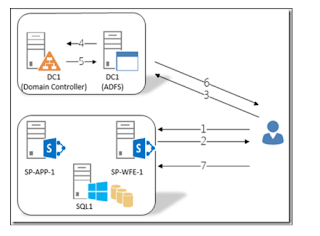
SharePoint 2013 - ADFS - Configuration

The main objective of this post is to provide detailed configuration steps on how to set up SAML Authentication for SharePoint 2013/2016 w...